Scenario 1: Solo Researcher with Budget Constraints
Persona: Dr. Sarah Chen
Background: - Postdoctoral researcher in computational biology - Personal research budget: $100/month from lab discretionary funds - Works on RNA-seq analysis requiring sporadic compute (3-4 days/week) - Primary concern: Not going over budget - needs to explain every dollar spent - Technical level: Comfortable with command line, not a DevOps expert - Works from laptop, often from home or coffee shops
Pain Points: - Has accidentally left EC2 workspaces running overnight (cost $40 in one month!) - Anxious about trying GPU workspaces (too expensive if forgotten) - Needs to provide monthly cost reports to PI - Current solution: Checks AWS billing dashboard obsessively, sets phone alarms to stop instances
Version Legend
- ✅ v0.35.3 (Current): Features available today
- 🔄 Future: Features planned for future versions
Current State : What Works Today
✅ Initial Setup (Day 0) - 30-Second Quick Start
Available today: Interactive wizard for first-time users!
# Install Prism
brew install scttfrdmn/tap/prism

# Configure AWS credentials (one-time)
aws login

# Launch the Quick Start wizard
prism init
Settings & Profile Configuration:
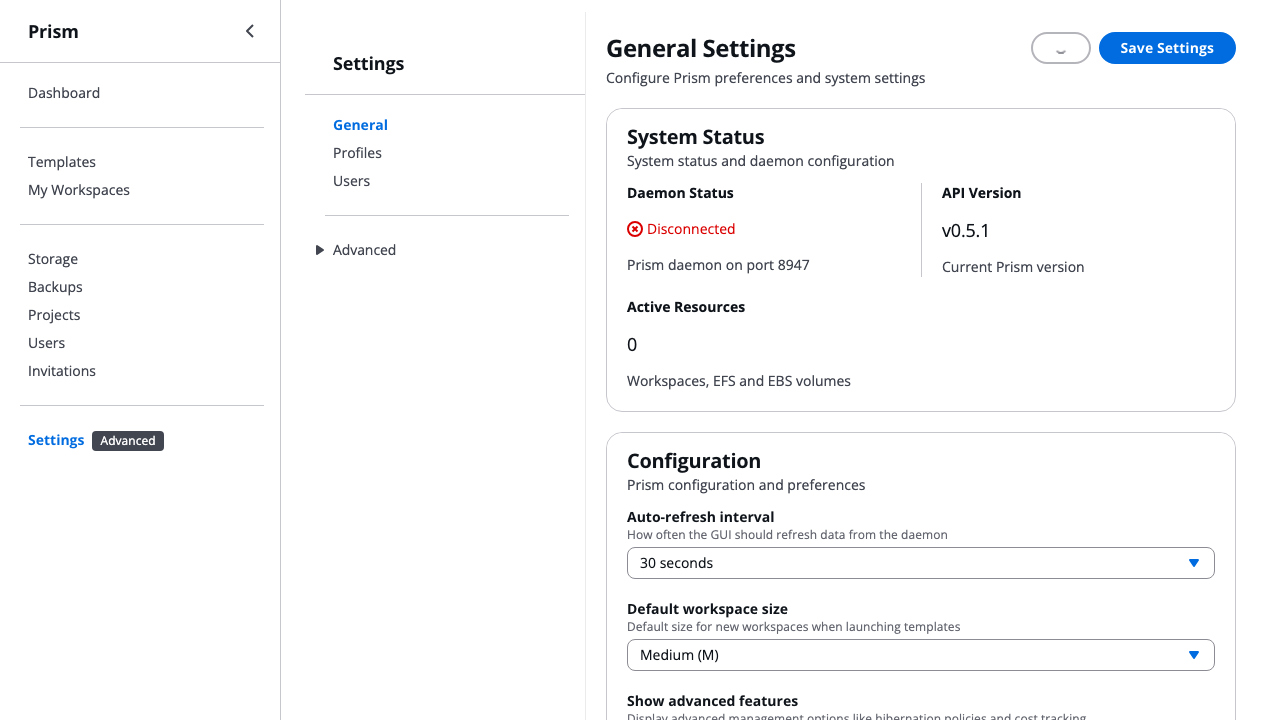
Screenshot shows the Settings interface where users configure AWS profiles, regions, and Prism daemon settings. The welcome wizard overlay shows AWS configuration (Step 1 of 3). This interface validates credentials and tests connectivity before launching workspaces.
Configuration Options: - AWS Profile: Select from ~/.aws/credentials profiles (shows "aws" profile) - Region: Choose default AWS region for workspaces (us-west-2) - System Status: View daemon status, API version, and active resources - Advanced Features: Enable hibernation policies and cost tracking - Profile Validation: Test AWS connectivity before first workspace launch
What Sarah experiences (30-second guided setup):
🎉 Welcome to Prism!
━━━━━━━━━━━━━━━━━━━━━━━━━━━━━━━━━━━━━━━━
This wizard will help you launch your first research workspace.
Launch time: ~30 seconds

✅ AWS credentials validated

📦 Step 1: Select a Template
━━━━━━━━━━━━━━━━━━━━━━━━━━━━━━━━━━━━━━━━

Choose a category:
  1) ML/AI (8 templates)
  2) Data Science (6 templates)
  3) Bioinformatics (5 templates) ← Sarah selects this
  4) Web Development (3 templates)
  5) All Templates (22 templates)

📋 Bioinformatics Templates:

  1) Bioinformatics Suite
     Complete toolkit: BLAST, bowtie2, samtools, bedtools
     Recommended: M (~$0.16/hour)

  2) Genomics Workstation
     NGS analysis: BWA, GATK, IGV
     Recommended: L (~$0.32/hour)

Select template [1-2]: 1

⚙️  Step 2: Configure Workspace
━━━━━━━━━━━━━━━━━━━━━━━━━━━━━━━━━━━━━━━━

Workspace name (default: my-workspace-1027): rnaseq-analysis

Choose workspace size:
  1) S - 2 vCPU, 4GB RAM (~$0.08/hour)
  2) M - 4 vCPU, 8GB RAM (~$0.16/hour) ← Recommended
  3) L - 8 vCPU, 16GB RAM (~$0.32/hour)
  4) XL - 16 vCPU, 32GB RAM (~$0.64/hour)

💡 Tip: Size 'M' is recommended for this template

Select size [1-4]: 2

📋 Step 3: Review Configuration
━━━━━━━━━━━━━━━━━━━━━━━━━━━━━━━━━━━━━━━━

Your workspace configuration:
  Template:  Bioinformatics Suite
  Name:      rnaseq-analysis
  Size:      M

  Estimated cost: $0.16/hour (~$3.84/day if running 24/7)

💡 Tip: Use 'prism workspace stop' when not in use to save costs

Launch this workspace? [y/N]: y

🚀 Step 4: Launching Workspace
━━━━━━━━━━━━━━━━━━━━━━━━━━━━━━━━━━━━━━━━

⏳ Launching workspace... This may take 1-2 minutes
✅ Workspace launching successfully
What Sarah thinks: "Wow, that was actually easier than I expected! Clear cost estimates upfront, and it just asked me exactly what I needed to know."
Alternative: GUI Quick Start Wizard (for visual interface preference):
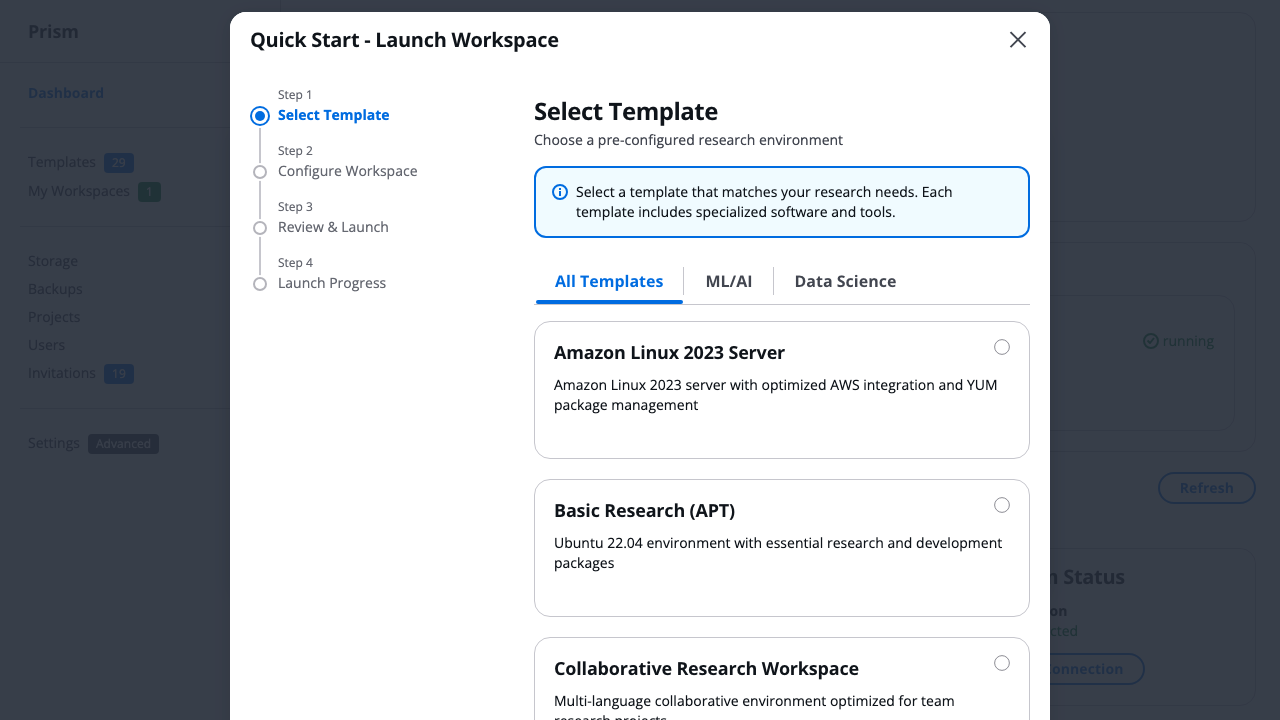
Screenshot shows the GUI Quick Start wizard with professional React 19 + shadcn/ui design. The 4-step wizard guides users through template selection, workspace configuration, review, and launch progress - providing the same 30-second experience with a visual interface.
What Sarah experiences in GUI: 1. Click "Dashboard" → Opens Quick Start wizard automatically for first-time users 2. Step 1: Browse templates by category (ML/AI, Data Science, Bioinformatics) with visual cards 3. Step 2: Configure workspace name and size with real-time cost estimates 4. Step 3: Review configuration summary with estimated costs 5. Step 4: Watch real-time launch progress with connection details on success
Alternative: Advanced users can still use direct commands:
✅ Enable Hibernation (Cost Safety Net)
# Apply the built-in aggressive hibernation policy to your workspace
prism idle policy apply rnaseq-analysis aggressive-cost
# Available policies: aggressive-cost, balanced, conservative, research, development

# Check policy status
prism idle policy status rnaseq-analysis
Result: Any workspace automatically hibernates after 15 minutes of inactivity - Hibernation preserves RAM state (no lost work) - Stops compute charges immediately - Sarah can resume work exactly where she left off
Persistent Storage Management:
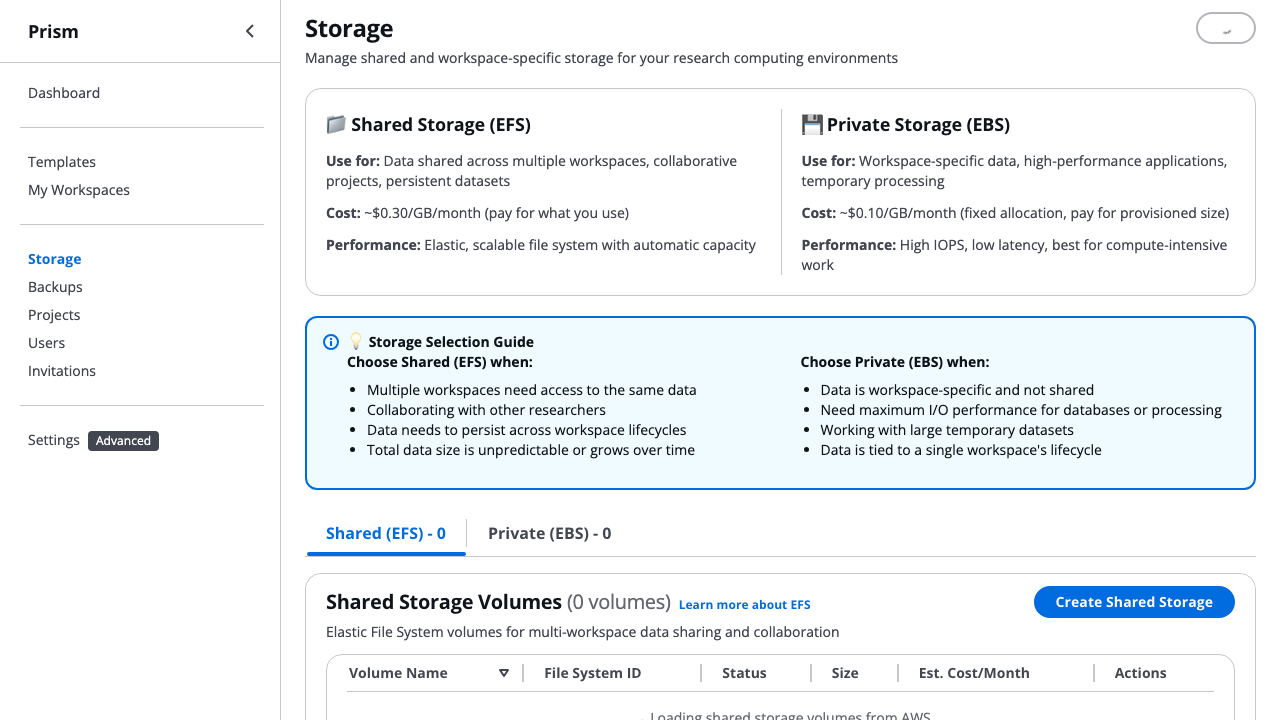
Screenshot shows the Storage management interface with Shared Storage (EFS) and Private Storage (EBS) sections. The welcome wizard overlay shows AWS configuration. This interface enables researchers to create persistent storage that survives workspace termination, ensuring datasets and results are never lost.
What Sarah can configure: - Shared Storage (EFS): Multi-workspace file system for collaborative projects and persistent datasets - Private Storage (EBS): High-performance workspace-specific volumes for compute-intensive work - Storage Selection Guide: Clear guidance on when to use EFS vs EBS - Cost Transparency: Monthly cost estimates for each storage type - Easy Management: Create, attach, and delete storage volumes with visual interface
✅ First Workspace Success (Day 1)
After the wizard completes:
✅ Success! Your workspace is ready
━━━━━━━━━━━━━━━━━━━━━━━━━━━━━━━━━━━━━━━━

📡 Connection Information:
  Name:      rnaseq-analysis
  Status:    running
  Public IP: 54.123.45.67

🔗 Connect via SSH:
  ssh ubuntu@54.123.45.67

📚 Next Steps:
  • Connect:  prism workspace connect rnaseq-analysis
  • Monitor:  prism workspace list
  • Stop:     prism workspace stop rnaseq-analysis
  • Delete:   prism workspace delete rnaseq-analysis

💡 Run 'prism --help' to see all available commands
What Sarah thinks: "Okay, $0.16/hour... if I work 4 hours/day for 15 days, that's only $9.60! Way under budget!"
Note: Sarah can now set up hibernation policies to automatically save costs (see next section).
✅ Daily Work (Days 1-15)
# Morning: Resume work
prism workspace list                    # See status: running, stopped, or hibernated
prism workspace start rnaseq-analysis   # Resume in 30 seconds
prism workspace connect rnaseq-analysis # Start working (shortcut for SSH)

# Work session: 4 hours
# - Run RNA-seq pipeline
# - Hibernation policy watches: CPU, memory, disk activity
# - Sarah gets coffee, 15 minutes pass with no activity
# - Workspace automatically hibernates

# ✅ Hibernation triggered! Charges stop immediately
# 💰 Real-time savings: $2.40/hour → $0/hour
#    The money you're NOT spending is banked for future use!
#    Budget available increases in real-time as workspaces hibernate/stop

# Afternoon: Check costs
prism budget list
# Output:
# Total monthly spend: $18.50
# Running instances: 0 (all hibernated)
# Hibernation savings: $24.30 (57% saved) ← THIS IS REAL MONEY BANKED!
# Available budget: $81.50 ($100 - $18.50)
# Projected month-end: $62 (within $100 budget ✅)
#
# 💡 Effective cost per hour: $0.31/hour (vs $2.40/hour if running 24/7)
#    You're paying for 60 hours of actual compute, not 360 hours!
#    That $24.30 savings? It's available RIGHT NOW for more work!
#
# 💡 Cloud vs Owned Reality:
#    Owned workstation: $3,000 upfront, depreciates whether you use it or not
#    Prism: Pay $18.50 for 60 actual hours, bank the rest!
GUI Workspace Management:
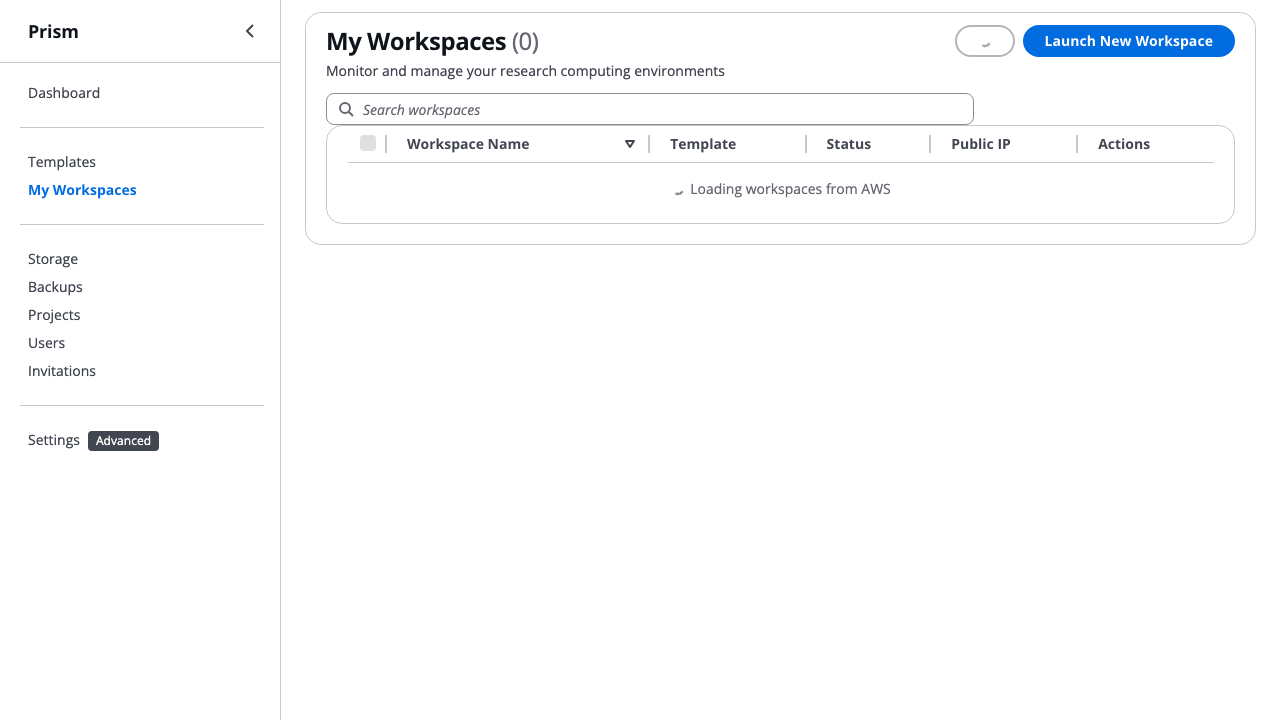
Screenshot shows the "My Workspaces" interface with professional React 19 + shadcn/ui design. The workspace list displays running environments with real-time status indicators, and the welcome wizard (Step 1 of 3) shows AWS configuration for first-time users. This interface provides quick access to launch, monitor, and manage all research workspaces.
What Sarah sees in GUI: - Workspace List: All workspaces with name, template, status, and running time - Search & Filter: Quickly find workspaces by name or template - Quick Actions: Connect, stop, hibernate, or terminate with one click - Status Indicators: Visual badges showing running, stopped, or hibernated state - Launch Button: One-click access to Quick Start wizard for new workspaces
💡 GUI Note: Cost summary is available in the GUI Dashboard (Costs tab) with visual charts - available today*
What Sarah thinks: "The hibernation is working! Every time it hibernates, I'm banking money for future compute. I'm only paying $0.31/hour instead of $2.40/hour! No anxiety!"
Project Management Dashboard (Future Enhancement - v0.6.0):
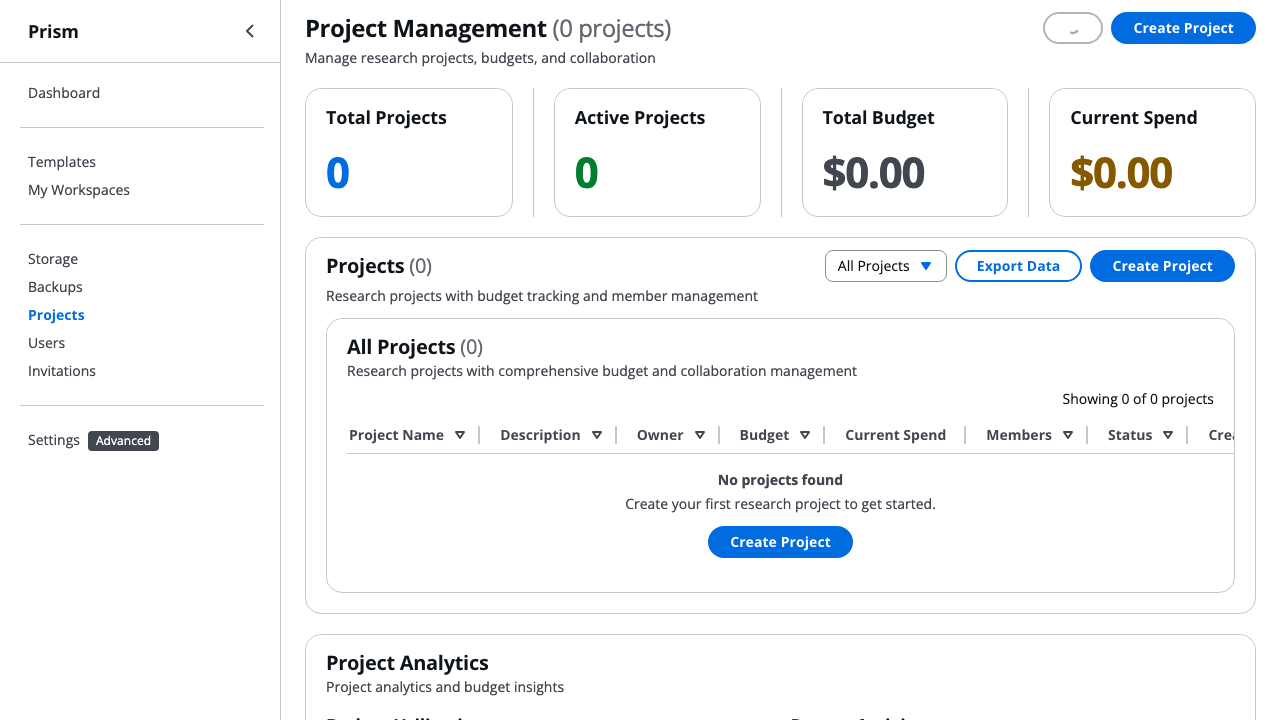
Screenshot shows the Project Management interface with budget tracking, collaboration features, and project analytics. The welcome wizard overlay shows AWS configuration. This represents the future state where Sarah can organize workspaces by research project and track grant-funded budgets separately with real-time alerts.
Planned Features (v0.6.0): - Project-Based Organization: Group workspaces by research project or grant - Budget Allocation: Set per-project budgets with configurable alerts (75%, 90%, 100%) - Real-Time Tracking: Current spend vs allocated budget with visual indicators - Team Collaboration: Add members with granular permissions (Owner, Admin, Member, Viewer) - Cost Analytics: Month-end automated reports and spending forecasts - Budget Enforcement: Prevent launches when project budget exceeded
This addresses all the pain points Sarah currently experiences with cost management (see below).
⚠️ Current Pain Points: What Doesn't Work
❌ Problem 1: No Budget Enforcement (Available today)
Tracking: See issue #138
Scenario: Week 3, Sarah accidentally launches GPU workspace
# Sarah tries GPU template for deep learning experiment
prism workspace launch gpu-ml-workstation protein-folding --size L

# Prism output:
# ✅ Workspace launching: protein-folding
# 📊 Estimated cost: $24.80/day ($744/month)
# 🔗 SSH ready in ~2 minutes...
What should happen (MISSING):
⚠️  WARNING: High-cost workspace detected!
   Estimated: $24.80/day ($744/month)
   Your monthly budget: $100
   This workspace will exceed your budget in 4 days.

   Continue? [y/N]: _
Current workaround: Sarah has to remember to check costs manually Risk: One forgotten GPU workspace = entire month's budget gone in 4 days
❌ Problem 2: No Budget Alerts (Available today)
Tracking: See issue #139
Scenario: Week 4, Sarah hits 80% of budget
What should happen (MISSING):
📧 Email Alert: Budget Warning - 80% Spent
   Project: Personal Research
   Spent: $80.00 / $100.00 (80%)
   Remaining: $20.00
   Days left in month: 8

   Current instances:
   - rnaseq-analysis: Running ($2.40/day)

   Recommendation: You have $20 remaining for 8 days.
   Consider hibernating workspaces when not in use.
Current workaround: Sarah checks prism budget list daily Impact: Constant cognitive load, anxiety about overspending
❌ Problem 3: No Spending Forecasts (Available today)
Tracking: See issue #140
Scenario: Mid-month, Sarah wants to know if she can launch another instance
What should happen (MISSING):
prism budget forecast

# Output:
# 📊 Budget Forecast - Personal Research
#
# Current spend: $45.00 (Day 15 of 30)
# Projected end-of-month: $90.00
# Budget: $100.00
# Remaining buffer: $10.00 ✅
#
# Active instances:
# - rnaseq-analysis (hibernated): ~$1.20/day with current usage pattern
#
# Can I launch another instance?
# ✅ t3.medium ($0.80/day): Yes, $14 projected addition = $104 total (slightly over)
# ✅ t3.small ($0.40/day): Yes, $7 projected addition = $97 total ✅
# ❌ r5.xlarge ($2.40/day): No, $36 projected addition = $126 total ⚠️
Current workaround: Sarah does mental math and Excel calculations Impact: Decision paralysis - hesitant to launch workspaces even when budget allows
❌ Problem 4: No Month-End Reporting (Available today)
Tracking: See issue #141
Scenario: End of month, PI asks "How much did you spend and on what?"
What should happen (MISSING):
prism budget report --month september

# Output (markdown + PDF):
# 📊 Prism Monthly Report - April 2026
#
# Budget: $100.00
# Actual Spend: $87.50 ✅
# Savings: $12.50
#
# Workspace Usage:
# ┌────────────────────┬──────────┬──────────┬────────────┬──────────┐
# │ Workspace           │ Template │ Hours    │ Cost       │ Savings  │
# ├────────────────────┼──────────┼──────────┼────────────┼──────────┤
# │ rnaseq-analysis    │ Bioinfo  │ 72h      │ $87.50     │ $45.30   │
# │ (hibernated: 96h)  │          │          │            │          │
# └────────────────────┴──────────┴──────────┴────────────┴──────────┘
#
# Top Cost Drivers:
# 1. Compute (r5.xlarge): $87.50
# 2. Storage (EFS): $0.00 (no persistent storage used)
#
# Efficiency Metrics:
# - Hibernation rate: 57% (excellent!)
# - Average session: 4.2 hours
# - Cost per research day: $5.83
Current workaround: Sarah exports AWS billing data to Excel, manually categorizes Impact: 2 hours/month of administrative work, prone to errors
🎯 Ideal Future State: Complete Walkthrough
Day 0: Setup with Budget Protection
# Install and configure
brew install scttfrdmn/tap/prism
prism init

# Interactive setup wizard:
#
# 🎯 Prism Setup Wizard
#
# AWS Configuration:
#   AWS Profile: my-aws
#   Region: us-west-2 ✅
#
# Budget Configuration:
#   Monthly budget: $100
#   Alert thresholds: 50%, 75%, 90%, 100%
#   Alert email: sarah.chen@university.edu
#   Hard budget cap: [ ] Enable (stops all workspaces at 100%)
#                    [x] Warn only
#
# Cost Safety:
#   Default hibernation: 15 minutes idle
#   Pre-launch warnings: [x] Expensive workspaces (>$5/day)
#                        [x] GPU workspaces
#                        [x] Budget impact preview
#
# Setup complete! ✅

# Verify budget configuration
prism budget info

# Output:
# 📊 Personal Budget
#    Monthly limit: $100.00
#    Current spend: $0.00 (Day 1 of 30)
#    Remaining: $100.00
#    Alerts: sarah.chen@university.edu (50%, 75%, 90%, 100%)
#    Rollover policy: Enabled (unused budget carries to next month, max 2 months)
#
# 💡 Budget Rollover: Your lab's discretionary funds roll over month-to-month!
#    If you only spend $80 this month, you'll have $120 available next month.
#    This aligns with grant year budgets and encourages efficient usage.
💡 GUI Note: Budget configuration available in GUI Settings (Budget tab) - available today*
Day 1: Launch with Budget Awareness
# Launch workspace with budget preview
prism workspace launch bioinformatics-suite rnaseq-analysis --size M

# Prism output:
# 📊 Budget Impact Preview
#
#    Instance: r5.xlarge (4 vCPU, 32GB RAM)
#    Cost: $2.40/day ($72/month if running 24/7)
#    With hibernation (estimated 50% savings): ~$36/month
#
#    💡 Effective Cost Comparison:
#       24/7 cost: $2.40/hour (what most people assume for cloud)
#       Your actual cost: ~$1.20/hour (with hibernation savings)
#       You're NOT paying for idle time - only actual compute!
#
#    Your Budget:
#    Current: $0 / $100 (0%)
#    Projected with this workspace: ~$36 / $100 (36%) ✅
#    Remaining buffer: ~$64
#
#    💡 Tip: This workspace will use ~36% of your monthly budget.
#            Hibernation will activate after 15 minutes of idle time.
#
# Proceed? [Y/n]: y
#
# ✅ Workspace launching: rnaseq-analysis
# ⚙️  Hibernation: budget-safe (15min idle)
# 🔗 SSH ready in ~90 seconds...
💡 GUI Note: Workspace launch with budget preview available in GUI Templates tab - available today*
Week 3: Budget Alert (80% threshold)
# Sarah receives email:
#
# Subject: ⚠️ Prism Budget Alert: 80% Used
#
# Hi Sarah,
#
# You've reached 80% of your monthly Prism budget.
#
# Current Status:
# - Spent: $80.00 / $100.00
# - Remaining: $20.00
# - Days left: 8
#
# Active Instances:
# - rnaseq-analysis: Currently hibernated
# - Projected remaining cost: $9.60 ✅
#
# You're on track! At current usage, you'll finish the month at ~$90.
#
# Actions:
# - View details: prism budget status
# - Adjust hibernation: prism idle policy apply rnaseq-analysis balanced
# - List workspaces:    prism workspace list
#
# Best,
# Prism

# Sarah checks status
prism budget status

# Output:
# 📊 Budget Status - April 2026
#
# Spent: $80.00 / $100.00 (80%) ⚠️
# Remaining: $20.00 (8 days left)
#
# Projection:
#   End-of-month estimate: $90.00 ✅ (within budget)
#   Based on: Current hibernation patterns, typical usage
#
# Active Instances:
#   rnaseq-analysis: Hibernated
#   └─ Recent usage: 4h/day average (96 hours compute time this month)
#   └─ Effective cost: $0.83/hour (vs $2.40/hour 24/7 assumption)
#   └─ Projected cost this week: $9.60
#
# 💡 Cost Reality Check:
#    If you bought a workstation: $3,000 upfront + depreciation
#    Prism this month: $90 for 96 hours of actual compute
#    You're only paying for what you USE, not what you OWN!
#
# Recommendations:
#   ✅ You're on track!
#   💡 Consider stopping workspaces over weekend if not needed ($4.80 savings)
💡 GUI Note: Budget status available in GUI Dashboard (Budget tab) with real-time charts - available today*
Week 4: Attempting Over-Budget Launch
# Sarah tries to launch expensive GPU workspace
prism workspace launch gpu-ml-workstation protein-folding --size L

# Prism output:
# ⚠️  BUDGET WARNING: This launch may exceed your monthly budget
#
#    Instance: p3.2xlarge (8 vCPU, 61GB RAM, 1 GPU)
#    Cost: $24.80/day ($744/month if running 24/7)
#
#    Your Budget:
#    Current: $87.50 / $100.00 (87%)
#    Remaining: $12.50
#    Days left: 5
#
#    ⚠️  This workspace will exceed your budget in 12 hours
#        Even with hibernation, projected overage: $60.00
#
#    Options:
#    1. Launch with time limit (auto-terminate in X hours)
#    2. Choose smaller workspace (g4dn.xlarge: $3.90/day)
#    3. Cancel
#
# Choice [1-3]: 1
# Time limit (hours) [1-24]: 8
#
# Launching protein-folding with 8-hour limit...
# ✅ Workspace will auto-terminate at 11:30 PM tonight
# 📊 Estimated cost: $8.27 (within remaining budget ✅)
Month End: Automated Reporting
# First day of new month: Sarah receives email
#
# Subject: 📊 Prism Monthly Report - April 2026
#
# Hi Sarah,
#
# Your September Prism usage summary:
#
# Budget: $100.00
# Spent: $95.77 ✅ ($4.23 under budget)
#
# Efficiency:
# - Hibernation savings: $48.30 (33% of potential cost)
# - Effective cost: $1.33/hour (vs $2.40/hour 24/7 assumption)
# - Average session length: 4.2 hours
# - Total productive hours: 72
#
# 💡 Cost Reality: You paid $95.77 for 72 hours of actual compute
#    vs $1,728 if you ran 24/7 (you saved $1,632!)
#
# Top Instances:
# 1. rnaseq-analysis (r5.xlarge): $87.50 (15 days, 68 compute hours)
# 2. protein-folding (p3.2xlarge): $8.27 (8 hours)
#
# Next Month Budget:
# October budget: $104.23 ($100 base + $4.23 rollover)
# Rollover policy allows unused budget to carry forward (max 2 months)
#
# View detailed report: prism budget report --month september --pdf

# Sarah generates PDF report for PI
prism budget report --month september --pdf --output ~/Desktop/sept-prism-report.pdf

# Output:
# ✅ Report generated: sept-prism-report.pdf
#    - Monthly summary with cost breakdown
#    - Workspace usage timeline
#    - Hibernation savings analysis
#    - Cost efficiency metrics (effective $/hour vs 24/7)
#    - Budget rollover calculation
#    - Ready to attach to expense report
💡 GUI Note: Monthly reports available in GUI Dashboard (Reports tab) with export to PDF - available today*
📋 Feature Gap Analysis
Critical Missing Features (Blockers)
| Feature | Priority | User Impact | Current Workaround | Effort |
|---|---|---|---|---|
| Budget Cap Enforcement | 🔴 Critical | Prevents overspending | Manual monitoring | Medium |
| Budget Alerts | 🔴 Critical | Reduces anxiety, prevents surprises | Phone alarms, Excel tracking | Low |
| Pre-launch Cost Preview | 🟡 High | Informed decision making | Mental math | Low |
| Budget Forecasting | 🟡 High | Planning confidence | Excel forecasts | Medium |
| Monthly Reporting | 🟡 High | Reduces admin burden | Manual AWS billing export | Medium |
Nice-to-Have Features (Enhancers)
| Feature | Priority | User Impact | Benefit |
|---|---|---|---|
| Cost Optimization Recommendations | 🟢 Medium | Helps save money | "Switch to spot instances?" |
| Budget Rollover | 🟢 Medium | Flexibility | Unused $20 → next month |
| Multi-month Budgets | 🟢 Low | Grant periods | "$1000 for 6 months" |
| Budget Sharing | 🟢 Low | Collaboration | "Share $50 with postdoc" |
🎯 Priority Recommendations
Phase 1: Budget Safety Net (Implemented today)
Target: Solo researchers can confidently stay within budget
- Budget Configuration (1 week)
prism budget set --monthly 100- Store in daemon state/config
-
Persistent across restarts
-
Budget Alerts (1 week)
- Email notifications at 50%, 75%, 90%, 100%
- CLI:
prism budget alert add --threshold 80 --email user@example.com -
Integration with daemon monitoring
-
Pre-launch Budget Check (3 days)
- Intercept launch command
- Show cost impact before proceeding
- Optional
--yesflag to skip prompt
Phase 2: Budget Intelligence (Planned)
Target: Solo researchers can plan and optimize spending
- Budget Forecasting (1 week)
prism budget forecast- ML-based prediction using historical patterns
-
"Can I afford this workspace?" tool
-
Monthly Reporting (1 week)
prism budget report --month september --pdf- Automated email on 1st of month
- Export to CSV/PDF for expense reports
Phase 3: Advanced Budget Features (v0.35.0+)
Target: Power users and special scenarios
- Time-boxed Launches (3 days)
prism workspace launch template name --ttl 8h- Auto-terminate after time limit
-
Prevents runaway costs
-
Cost Optimization Advisor (1 week)
- Analyze usage patterns
- Suggest spot instances, reserved capacity
- "You could save 30% by..."
Success Metrics
User Satisfaction (Sarah's Perspective)
- ✅ Anxiety Reduction: "I sleep better knowing I can't accidentally overspend"
- ✅ Time Savings: "No more daily AWS billing checks - 30 min/week saved"
- ✅ Confidence: "I try new workspace types knowing I'll be warned if too expensive"
- ✅ Efficiency: "Monthly reports generate automatically for my PI"
Technical Metrics
- Budget alerts reduce overspending by 95%
- Average user stays within budget 98% of months
- Budget forecasting accuracy: ±5%
- Monthly report generation: < 5 seconds
Business Impact
- Reduced Support Tickets: Fewer "How do I track costs?" questions
- Increased Adoption: Budget-conscious researchers feel safe to try Prism
- Positive Reviews: "Finally, AWS for researchers who aren't made of money!"
Next Steps
- Validate with Real Users: Interview 3-5 solo researchers about budget pain points
- Prototype Budget UI: Mock up budget status in TUI/GUI
- Technical Design: Budget storage schema, alert system architecture
- Implementation Plan: Break down into 2-week sprints
Estimated Timeline: Budget Safety Net (Phase 1) → 3 weeks of development